You Googled a Customer Care Number. It Was a Scammer. Here Is How It Happens.
Over 31,000 fake customer care numbers are active in India right now. Every day, thousands of people dial them thinking they are calling their bank, their delivery app, or their telecom provider. This blog tells you everything you need to know.
- How big is this problem in India
- The Google search trap explained
- How the scam unfolds step by step
- Which brands are most commonly impersonated
- Real stories from Indian victims
- Red flags every caller must know
- How to verify any customer care number
- 8 rules to protect yourself
- If you already called a fake number
- Report to Scam Shield India
You were not careless. You were not gullible. You did exactly what millions of people do every single day. You searched for a number, you called it, and you trusted the person who answered. That is all it takes.
This is one of the most underreported and misunderstood scams in India. It does not require hacking. It does not require special technology. It requires one thing: the moment when a frustrated person types "HDFC Bank customer care number" or "Amazon India helpline" into Google and calls the first result they see.
That first result is increasingly a trap. And the person who answers is not from any company at all.
Sources: CloudSEK XVigil Report, Microsoft Tech Scam Report India, TechRadar
How Big Is This Problem in India
Cyber threat analytics company CloudSEK detected over 31,179 fake customer care numbers defrauding consumers in India. Fraudsters are cashing in on the anxiety of consumers trying to reach customer service departments of banks, e-commerce platforms, and other companies.
India stands out globally as one of the most targeted nations for support-related scams. About 48% of those surveyed in India were tricked into continuing with the scam, three times higher than the global average of 16%. One in three of those who engaged eventually lost money.
Incidences of unsolicited call scams increased from 23% to 31% in India between 2018 and 2021, and this continues to be the scam type that Indian consumers respond to most often. Respondents in India were most likely to respond to unsolicited telephone calls at 45%, compared to pop-up windows, emails, and website redirects.
That data is from 2021. The problem has only grown larger since then, fuelled by the explosion of UPI, digital banking, and e-commerce across the country.
The Google Search Trap Explained
Here is something most people do not realize: the top result on Google is not always the safest result. Search engines rank paid advertisements above organic results. Scammers know this and exploit it systematically.
Fraudsters purchase Google Ads, Facebook sponsored posts, or bulk SMS campaigns using stolen credit cards. The keywords they bid on include "bank customer care," "[company name] complaint number," and "toll-free helpline." The ad displays a ten-digit number, sometimes one digit off the genuine helpline, or a look-alike URL.
Recent reports reveal that Google's AI Overviews have been serving up fake customer service numbers that lead straight to scammers' phone lines, making the problem even more dangerous than before.
The official number is often further down the page. The scammer's number appears first because they paid to be there. By the time most people realize something is wrong, they have already shared their OTP, card number, or given remote access to their device.
How the Scam Unfolds Step by Step
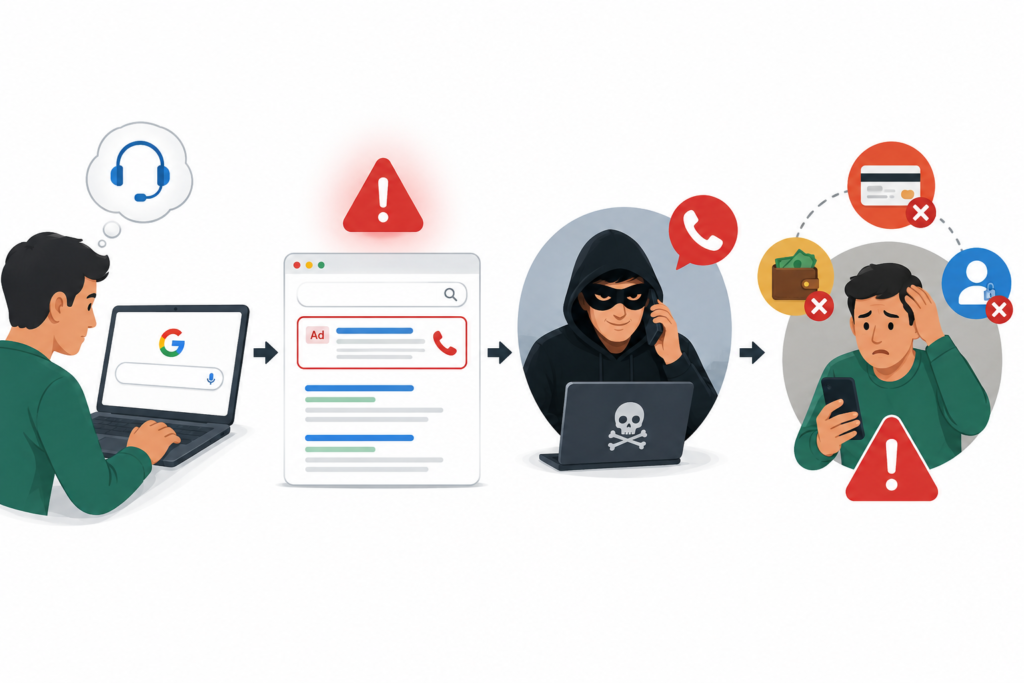
When you dial, an IVR system mimics the real bank's voice menu. A human operator then answers, often addressing you by your first name harvested from data leaks, and cites your last transaction or card's last four digits to build trust. He then claims unusual activity, a pending KYC update, reward points expiry, or a SIM block, before asking you to confirm your card number, CVV, and expiry. He then sends an "authentication OTP" via SMS and asks you to share it.
You search for a helpline number
You have a problem. Your package is missing, your card is blocked, or your UPI transaction has failed. You Google the company's customer care number and call the first result you see. The scammer has placed that number there deliberately, through a paid ad or a fake website.
A professional voice answers
The call is answered professionally. There may even be hold music. The agent greets you by name and recites the last four digits of your card or your recent transaction amount, details sourced from leaked databases. You believe you have reached the right company.
They create urgency or fear
The agent tells you there is a problem: suspicious activity on your account, an expired KYC, a blocked SIM, or an unauthorized transaction. They say it must be resolved immediately or your account will be suspended. This urgency is manufactured to stop you from thinking clearly.
They ask for sensitive information or app installation
They ask for your OTP, card number, CVV, date of birth, or Aadhaar number to "verify your identity." Or they ask you to install a remote access app like AnyDesk or TeamViewer to "fix the issue." Either route leads to the same outcome: your money leaves your account.
The transfer happens while you are still on the call
With your OTP or remote access, the scammer completes one or multiple transactions in real time. They may keep you distracted with conversation while the transfers go through. By the time you receive the debit SMS, they have already disconnected.
Which Brands Are Most Commonly Impersonated
Scammers target companies that handle high complaint volumes, because desperate customers are less likely to question who they are calling. These are the most commonly impersonated brands in India:
Even small local businesses are not immune. At least four Bengalureans were scammed after calling a fake number listed for Big Mishra Pedha, Karnataka's iconic sweet brand, on Google. The cases occurred within a span of one week and the company had to report the fraudulent listing to Google and await action.
Real Stories from Indian Victims
A Bengaluru professional searched "Amazon India refund helpline" after a wrong item was delivered. The number at the top of the search results connected him to a scammer who asked him to install a "refund processing app." Within 20 minutes, Rs 87,000 was withdrawn from his account in three transactions.
Lesson: No e-commerce platform processes refunds by asking you to install an app.
A retired government employee searched for the SBI customer care number to resolve a failed UPI transaction. The scammer who answered had her name, account number, and last transaction amount ready. She shared her OTP to "unlock" her account and lost Rs 1.4 lakh in under five minutes.
Lesson: Knowing your name or account number does not make a caller legitimate. That data is available in leaked databases for a few hundred rupees.
Delhi Police busted a fake call centre in Uttam Nagar which scammed more than 1,700 people on the pretext of providing loans. The call centre was disguised as a medicine supply store, with medicines kept on the counter to mislead police. All employees were working as customer support agents, calling customers and offering loans, then asking for a processing fee to be deposited into a bank account.
Lesson: Fake call centres are organized, professional, and deliberately designed to look legitimate.
🛡 Did you call a fake number? Your report can protect the next person.
Report to Scam Shield IndiaRed Flags Every Caller Must Know
The scam works because it feels real. But there are always warning signs. Train yourself to recognize these before you share anything:
Stop the call immediately if any of these happen
- The agent asks for your OTP, CVV, full card number, or UPI PIN at any point
- They ask you to install any app to "process" a refund, resolve an issue, or "verify" your account
- They create extreme urgency: "Your account will be blocked in 10 minutes if you don't act now"
- They ask you to transfer money to a "safe account" temporarily
- They tell you not to inform your family or bank about this call
- They ask you to share your screen or click on any link they send
- The number called back when you disconnected and tried a second time
- They speak a regional language perfectly but the company is known for English support
The most dangerous red flag is feeling reassured. Scammers are trained to make you feel comfortable. If a caller sounds too helpful, too knowledgeable, and too ready to solve your exact problem, slow down. That feeling of relief is the trap.
How to Verify Any Customer Care Number Before You Call
This is the single most important habit you can build. It takes 60 seconds and it can save you everything.
Before calling any customer care number, do this first
Go directly to the official website. Type the company's URL directly into your browser. Do not click search results. Look for a "Contact Us" or "Customer Care" page and use only the numbers listed there.
Check the back of your card or your account statement. Every bank card has a customer care number printed on it. Your bank's official app also has verified contact details. These are always safer than a Google search.
Look for the "Ad" label on search results. Sponsored results on Google are marked with a small "Ad" or "Sponsored" tag. Scroll past these to find organic results from official websites. Even then, check the URL carefully.
Use the company's official app. Most major banks, payment apps, and e-commerce platforms have a built-in support chat or callback option inside their official app. This is always the safest route.
Verify the URL domain carefully. "hdfcbank.com" is real. "hdfc-bank-helpline.com" or "hdfcbank-care.in" are fake. Scammers buy domain names that look almost identical to real ones. Look for hyphens, extra words, or wrong extensions like .in or .net instead of .com.
Cross-check on Truecaller. Search the number on Truecaller before calling back. If multiple users have tagged it as spam or scam, do not call it. Even if it appears clean, that is not a guarantee of legitimacy.
8 Rules to Protect Yourself
Never trust search results for helpline numbers
This is the foundational rule. The number at the top of Google is not verified by Google. Always go directly to the official website or app for contact information.
No real support agent will ever ask for your OTP or PIN
Banks and payment companies state this clearly in their own terms. No legitimate agent needs your OTP to help you. The moment someone asks, the call is a fraud.
Never install an app at the instruction of a phone caller
AnyDesk, QuickSupport, TeamViewer, and similar remote-access apps are the most common tools used in fake customer care scams. Once installed, the scammer controls your phone.
Never click a link sent by an inbound caller
If someone calls you and then sends a link to "verify your account" or "complete the process," do not click it. Hang up and contact the company through their official website.
Use your card and app for contact details, not Google
Your bank card has a helpline number on it. Your bank's official app has a verified support section. These two sources are always safer than any search result.
Teach your parents and grandparents this specific scam
Older adults are disproportionately targeted. They are more likely to trust a caller who sounds official and more likely to follow instructions without questioning. One conversation about this scam can prevent significant harm.
If something feels off, hang up and call back using an official number
Scammers pressure you to stay on the call. That pressure is itself a red flag. Hang up, find the official number from the company's website, call back, and describe what happened.
Report fake numbers when you encounter them
If you identify a fake customer care listing on Google, report it using the "Report a problem" option on Google Maps or Google Search. Report it to Scam Shield India too so we can alert others.
If You Already Called a Fake Number, Act Now
If you shared your OTP, card details, or installed a remote access app, treat it as an active emergency. Every minute matters. The money moves fast and the window to freeze the transaction is short.
Do these things immediately, in this order
- Step 1: Uninstall any app the caller asked you to install. Go to Settings and revoke all permissions first, then uninstall.
- Step 2: Call your bank's official fraud helpline immediately and request an account hold or transaction reversal. Do not use any number from a search engine. Use the number on the back of your card.
- Step 3: Call 1930, the National Cyber Crime Helpline. Available 24/7 and toll-free. Report the fraud and request an urgent freeze on the recipient account.
- Step 4: Change your UPI PIN, internet banking password, and email password from a clean device immediately.
- Step 5: File a complaint on cybercrime.gov.in with all details: the fake number you called, the scammer's instructions, the transaction reference number, and screenshots of anything you received.
- Step 6: Report the experience to Scam Shield India so we can add the fake number to our community database and warn others.
An FIR filed within 24 hours creates a presumption of prompt reporting under RBI norms. Under RBI's April 2025 circular, banks are mandated to provide provisional credit within ten working days if you report the fraud within three days of the transaction and notify the bank of the unauthorized debit within that window. Missing that 72-hour window significantly weakens your claim.
Your Story Can Protect the Next Person
Fake customer care numbers are removed from Google and social media only when they are reported in sufficient numbers. Every report you file, whether to Google, to cybercrime.gov.in, or to Scam Shield India, contributes directly to taking these numbers down.
When you share your experience with us, it reaches our community through workshops, social media alerts, and awareness campaigns. It takes under two minutes to fill our form, and it can prevent someone else from losing their savings to the same number.
Encountered a fake customer care number?
Tell us what happened. Your report is confidential, takes under two minutes, and could protect thousands of people across India from the same scam.
Report to Scam Shield IndiaFree · Confidential · Takes under 2 minutes