How to Identify a Fake Website — 10 Warning Signs to Check Right Now
Scammers build websites that look almost identical to real banks, shops, and government portals. Here's exactly how to spot a fake before you lose your money or data.
You receive a link on WhatsApp — it looks like your bank's website. The logo is there, the colors match, and there's even a login form. But something feels slightly off. Should you trust it?
Fake websites — also called phishing sites — are one of the most common tools scammers use in India today. They copy real websites almost pixel-for-pixel to steal your login credentials, OTPs, or payment details. Learning to spot them takes less than a minute once you know what to look for.
10 warning signs of a fake website
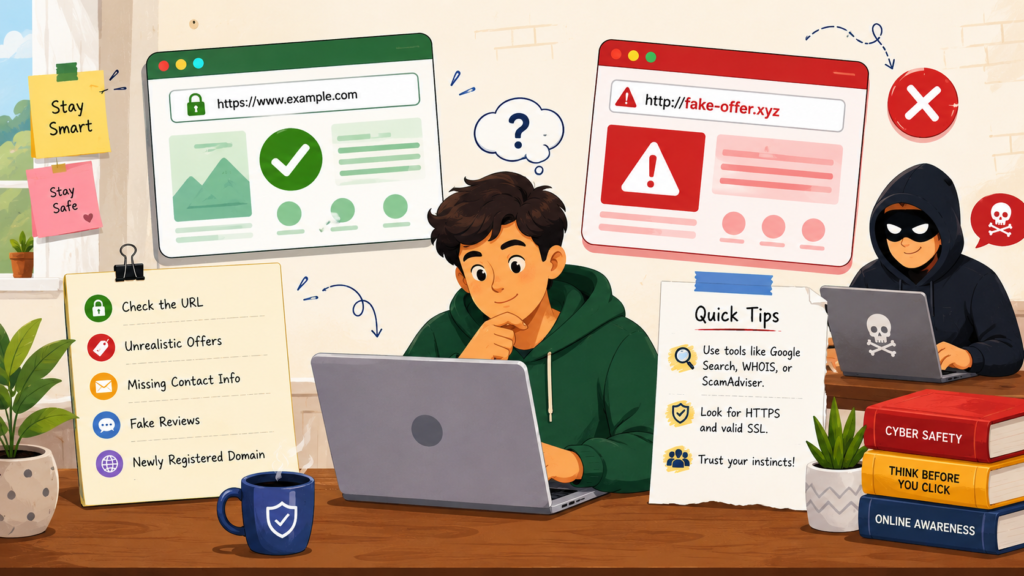
How to read a URL like an expert
The web address (URL) is the single most reliable way to spot a fake site. Here's how to read it:
✓ Real website
HTTPS ✓ | Official domain: sbi.co.in ✓ | No extra words before the main domain ✓
✗ Fake website examples
The real domain is always the word immediately before the last dot + extension (.com / .in / .gov.in). Everything before it is just a subdomain that anyone can create.
Free tools to check if a website is safe
Before entering any personal or payment information on an unfamiliar site, run it through one of these free tools:
- Google Safe Browsing — safebrowsing.google.com — checks if a site is flagged for phishing or malware
- VirusTotal — virustotal.com — scans the URL against 70+ security databases
- WHOIS Lookup — whois.domaintools.com — shows you when the domain was registered (very new = suspicious)
- Scam Adviser — scamadviser.com — gives a trust score with a breakdown of risk factors
Common fake websites targeting Indians
Fake government portals
Scammers copy government websites (income tax, passport seva, e-challan) and charge fees for services that are free. Always use URLs ending in .gov.in for any government service.
Fake bank and UPI sites
Phishing sites that look exactly like SBI, HDFC, or ICICI login pages. They capture your username and password, then use it to drain your account. Your real bank will never ask you to verify your account via a link.
Fake online shopping sites
Websites offering brand-name products at 70–80% discount. They collect payment and either send fake products or nothing at all. Stick to verified platforms — Flipkart, Amazon, Myntra — and be skeptical of unknown shopping sites offering heavy discounts.
Fake loan and job portals
Sites that promise instant loans or high-paying remote jobs, then ask for a "processing fee" or "security deposit" upfront. No legitimate lender or employer will ask you to pay them before receiving anything.
What to do if you already entered your details on a fake site
- Change your passwords immediately — especially for your bank, UPI, and email accounts
- Call your bank's helpline — ask them to block your card or account if you entered payment details
- Call 1930 — the national cyber crime helpline — if any money has moved
- Report the fake site on cybercrime.gov.in and on Google Safe Browsing (so others are protected)
- Report on Scam Shield India — our team can help you take the right next steps
Quick safety checklist before you trust any website
- ✓ The URL starts with https:// and has a padlock
- ✓ The domain name matches the official brand exactly
- ✓ The site has a proper "About Us," "Contact," and "Privacy Policy" page
- ✓ The contact email uses the company's own domain (not Gmail/Yahoo)
- ✓ You navigated to the site yourself — not via a WhatsApp or SMS link
- ✗ The URL has extra words like "secure," "login," "verify," or "support"
- ✗ The site is asking for your OTP, PIN, or full card number
- ✗ There are spelling mistakes or broken English on the page
- ✗ The offer seems too good — massive discounts, lottery wins, guaranteed loans
Found a fake website? Report it to us.
Help protect other Indians. Submit the URL and details on Scam Shield India — our team will review it and escalate to the right authorities.
Report a fake website